A Guide to Managed IT Services and MSPs for IT Leaders in 2026
A guide to managed IT services and MSPs. Learn pricing models, contract types, co-managed IT frameworks, and how to choose, manage, or switch providers with confidence.

I talk to IT leaders every week who feel buried under a mountain of support tickets. You manage a growing infrastructure, but your internal team spends their days resetting passwords instead of planning the cloud migration. This is where managed IT services become a necessity.
If you already know what you need and want a quick list of top vendors, skip straight to our guide on the best IT managed service providers and MSPs to work with in 2025. If you want to build a sustainable operating model, keep reading. I will walk you through the Workload Delegation Matrix to help you decide exactly what to keep in-house and what to outsource.
What Are Managed IT Services?
Managed IT services involve outsourcing the management, monitoring, and maintenance of your IT infrastructure to a third-party provider under a recurring service agreement. These providers take over tasks like security protocols, disaster recovery, and system maintenance to minimize your downtime.
Break-fix IT means you call a technician only when a server crashes or a network switch fails. Managed services flip this model. You pay a predictable monthly fee for a team to monitor your systems 24/7 and prevent the failures from happening in the first place.
What Does a Managed Service Provider (MSP) Actually Do?
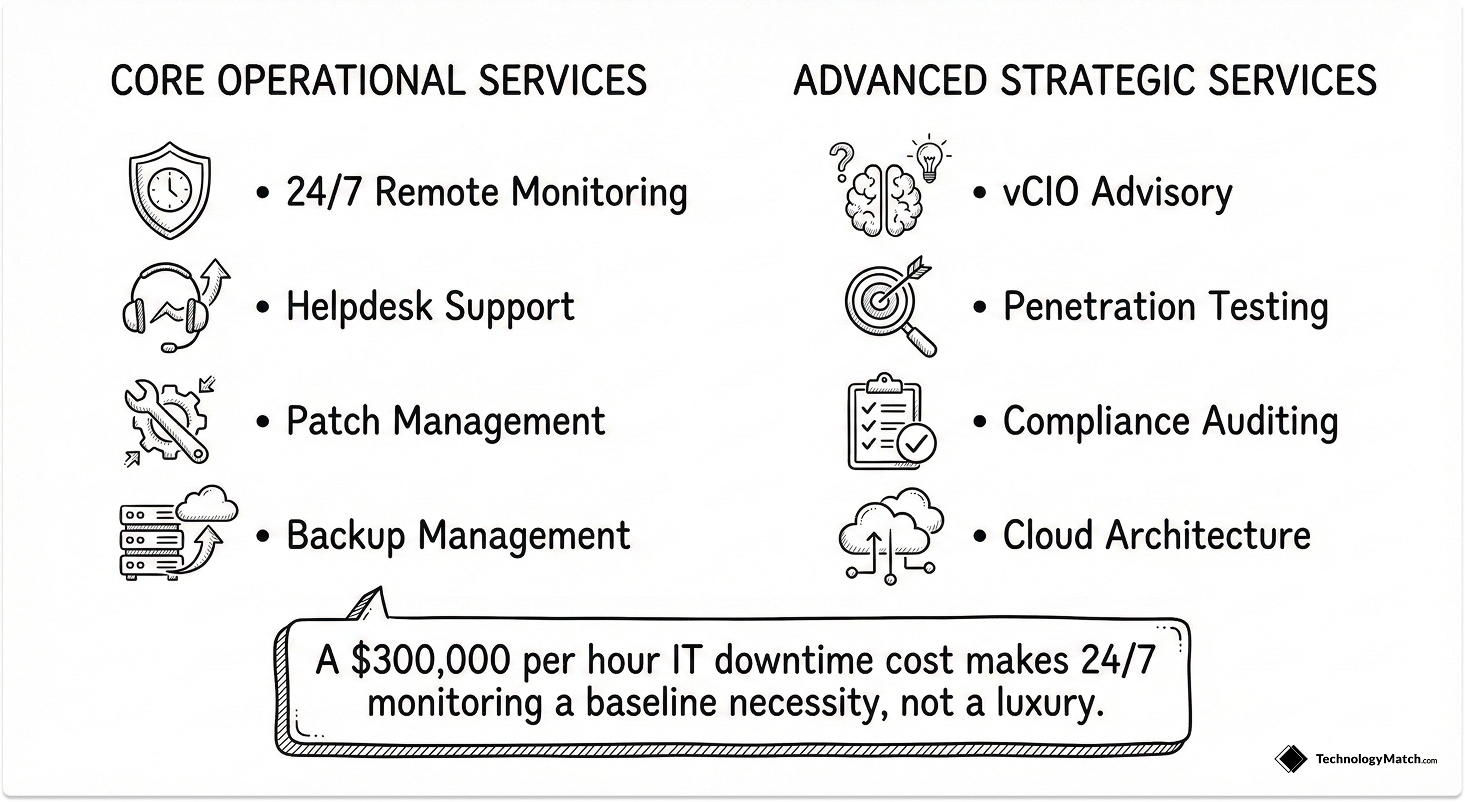
An MSP takes ownership of keeping your environment secure and operational. They execute specific operational routines to ensure your internal team is not overburdened. I use the Service Capability Framework to categorize these offerings for clients during the procurement phase.
Core Services Offered by MSPs
24/7 Remote Monitoring and Endpoint Management
MSPs deploy software agents across your entire network to track system health in real-time. This continuous oversight allows their engineers to identify failing hard drives, memory leaks, and network bottlenecks before they cause actual system crashes.
They manage the baseline health of your servers and employee workstations without requiring physical access to the devices.
For example, a regional logistics company running a 24-hour dispatch center relies on constant server uptime. The MSP monitors their dispatch routing software overnight and automatically restarts failing services before the morning shift arrives.
Failing to implement continuous monitoring carries severe risks. Organizations that rely on manual checks often miss early warning signs of hardware failure.
This negligence directly leads to catastrophic network outages during peak business hours. The average cost of IT downtime for businesses reaches $300,000 per hour.
Helpdesk and Tiered Technical Support
Your provider acts as the first point of contact for all employee technical issues. They handle password resets, software installations, and basic connectivity troubleshooting at the Tier 1 level.
When complex network or server issues arise, they escalate these tickets to their advanced Tier 2 and Tier 3 engineering teams for faster resolution.
Consider a mid-sized accounting firm during tax season. When fifty accountants experience software access errors simultaneously, the internal IT manager cannot handle the ticket volume alone.
The MSP absorbs this sudden influx of requests and resolves the access errors systematically so the internal team can focus on the business logic.
If you ignore helpdesk delegation, you force your highly paid internal system administrators to waste their time on basic troubleshooting. This misalignment causes strategic projects to stall and creates widespread frustration among your staff.
Backup and Disaster Recovery Management
Providers design and test automated data backup schedules to protect your critical business information. They configure secure off-site cloud storage repositories and maintain strict data retention policies.
More importantly, they run regular simulated recovery drills to verify they can restore your systems quickly after a critical failure.
A healthcare clinic maintaining thousands of patient records faces constant compliance pressures. The MSP ensures their database backs up incrementally every hour and verifies the integrity of those backups daily to prevent permanent data loss.
Relying on untested local backups is a massive operational risk. When a natural disaster or targeted attack destroys the primary servers, unverified backups usually fail to restore properly.
The average ransomware recovery cost for organizations recently surged to $2.73 million, which is a financial blow that can bankrupt unprepared companies.
Types of Managed Service Providers
You do not have to hand over the keys to your entire kingdom. IT partners come in different shapes to fit your exact operational maturity. If you are struggling to map these models to your specific business case, review our complete breakdown on MSP vs MSSP vs Co-Managed IT.

Fully Managed IT
The MSP acts as your entire IT department. They manage the strategy, the execution, and the daily support. This works best for early-stage startups that only need basic support functions and compliance guidance.
Co-Managed IT
Your internal team works alongside the external partner. You lean on the MSP for specific projects and expertise but rely on your internal team for strategic project management and support.
Specialized and Vertical MSPs
Some providers focus entirely on a specific domain. A cybersecurity MSP monitors your perimeter and manages incident response. An industry-specific MSP understands the exact compliance needs of healthcare or finance organizations.
Types of Managed IT Service Contracts
Selecting the right financial agreement determines the success of your vendor relationship. I guide IT leaders through these standard contracting models using our Vendor Engagement Matrix.
The Monthly Retainer
You pay a fixed monthly fee based on your total number of users or devices. This model covers all agreed-upon support and monitoring services. It provides predictable billing for your finance department and incentivizes the vendor to prevent problems rather than profit from fixing them.
Multi-Year Strategic Agreements
Enterprise providers often require one to three-year commitments. These long-term contracts allow the vendor to absorb the high upfront costs of onboarding your infrastructure and deploying their security tools. In return, you secure a lower monthly rate and guarantee dedicated engineering resources for long-term technology roadmaps.
Pilot Engagements
If you are hesitant to sign a three-year contract, you can negotiate a 90-day pilot program. This short-term agreement limits the scope of services to a specific department or a single physical location. You test their actual response times and technical capabilities before committing your entire infrastructure to their care.
The Break-Fix Hybrid
Some companies retain a provider for basic 24/7 monitoring but agree to pay hourly rates for active helpdesk support and project work. This model appears cheaper initially but creates unpredictable monthly invoices. I advise against this structure because it discourages employees from calling for help to save money. This hesitation allows small technical issues to fester into massive system failures.
How Much Do Managed IT Services Cost?
I implement the IT Investment Allocation Framework to help organizations benchmark their technical spending against industry averages. Managed IT costs vary drastically based on your user count, infrastructure complexity, and security requirements. Understanding the exact pricing models prevents you from signing an agreement filled with hidden fees.
Per-User Pricing Models
The per-user model is the most common billing structure in the industry today. You pay a flat monthly fee for every employee who requires technical support, regardless of how many devices they use. This model typically ranges from $100 to $200 per user per month.
A standard per-user agreement usually includes unlimited helpdesk support, basic endpoint security, Microsoft 365 administration, and proactive network monitoring during normal business hours.
This structure works perfectly for modern corporate environments where a single employee might seamlessly switch between a company laptop, a mobile phone, and a home office workstation. It scales predictably. When you hire a new employee, your IT budget increases by exactly one user license.
Per-Device Pricing Models
Instead of billing by the employee, the per-device model bills you for each piece of hardware the vendor manages. Providers assign different price points to different types of equipment based on the maintenance required.
Standard desktops and laptops typically cost $50 to $100 per month. Physical servers require intense maintenance and range from $150 to $300 per month. Infrastructure hardware like network switches and firewalls average $25 to $75 per month.
I recommend the per-device model strictly for environments with shared workstations. If you run a manufacturing floor or a retail storefront where twenty employees share three computer terminals across different shifts, per-device pricing saves you a massive amount of money compared to licensing every single worker.
Co-Managed and Flat-Rate Pricing
Mid-market companies often outgrow standard pricing packages. When you establish an internal IT department, you do not need a vendor to handle everything. Co-managed pricing allows you to negotiate a lower base retainer for a specific block of services.
You might pay the provider exclusively to monitor your backup servers and handle overnight alerts while your internal team manages all the daily employee support tickets.
Alternatively, some providers offer flat-rate pricing. You pay a single, uncompromising monthly fee for unlimited support across your entire organization. While finance departments love the absolute predictability of a flat rate, you must review the contract closely.
Flat-rate agreements often contain strict limitations regarding what qualifies as a "project" versus what qualifies as "support." A major server migration will usually trigger a massive out-of-scope project invoice.
Cost Breakdown: Internal IT Hire vs. Managed Service Provider
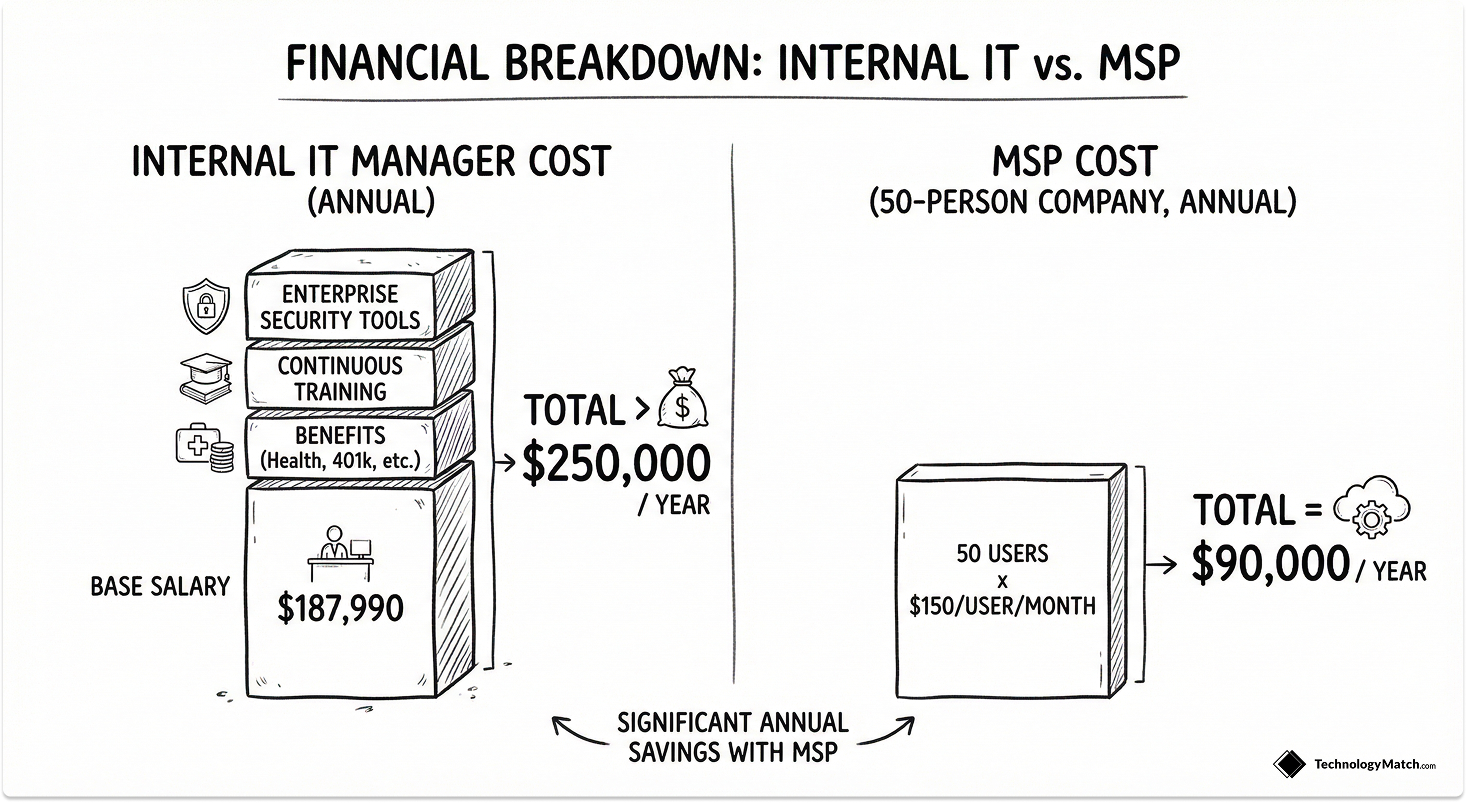
The financial gap between building an internal team and outsourcing is substantial. Consider the baseline cost of an internal hire. The average annual salary for an IT manager in the United States currently sits at $187,990.
That salary only represents the base compensation. When you factor in healthcare benefits, ongoing training, software licensing, and the specialized security tools required to protect the network, the true cost of a single senior internal hire easily exceeds $250,000 annually. Furthermore, one person cannot monitor a network 24 hours a day.
Conversely, consider a 50-person company utilizing a comprehensive MSP plan priced at $150 per user. The total annual cost equals $90,000. You gain access to a full team of specialized engineers, enterprise-grade security tools, and automated overnight monitoring for a fraction of the cost of a single senior executive.
The primary risk implication is control. The internal hire dedicates 100 percent of their attention to your business goals. The external provider splits their attention across dozens of clients. You trade absolute control and immediate dedication for specialized expertise and scale.
Key Factors That Increase Managed IT Costs
Your final monthly invoice rarely sits at the base minimum. Several specific operational requirements will drive your costs upward. If you need a framework for negotiating these costs, review our guide on how and where to find IT vendors and solutions.
Security and Compliance Maturity
Adding advanced threat detection or compliance management for frameworks like HIPAA and SOC2 increases the monthly bill. You are paying for specialized cybersecurity talent. However, skipping these services is a terrible financial gamble.
The average cost of a data breach for some companies reached a record $10.22 million in 2025. Paying a premium for proactive security prevents catastrophic financial losses later.
Disaster Recovery Service Level Agreements
If you demand immediate server failover and zero-downtime disaster recovery, the infrastructure costs multiply rapidly. Providers must maintain expensive redundant cloud environments to meet those strict SLAs.
High-impact IT outages cost businesses a median of $33,333 for every single minute systems remain offline. Furthermore, the average ransomware recovery cost now sits at $1.53 million. Advanced disaster recovery packages act as premium insurance policies against these specific threats.
24/7 Support Coverage
A standard contract covers support from Monday through Friday during regular business hours. If you operate a 24-hour logistics company and require guaranteed midnight support, the provider must staff overnight engineering teams. This extended coverage typically adds a 20 to 30 percent premium to your base user fee.
Multi-Location Complexity
Managing a single office with fifty people is straightforward. Managing fifty people spread across six different regional offices requires complex remote monitoring configurations, secure VPN tunnels, and customized routing equipment. Every physical location you add increases the total management overhead and your monthly cost.
The State of Managed IT: Industry Realities
The shift toward outsourced infrastructure management is accelerating rapidly. Currently, 73% of companies have implemented managed services to handle their technical operations. This massive adoption occurs because internal IT teams simply cannot scale fast enough to meet modern security demands.
The financial data supports this transition. Studies show that 46% of companies that switched to an MSP model saw their IT costs go down.
The global managed IT services market reflects this heavy demand, as it is projected to expand to $520.54 billion by 2032. This expansion represents a steady global compound annual growth rate of 9.5%.
Organizations are no longer outsourcing just to save money on salaries. They outsource to survive the current threat environment.
When Should You Hire an MSP?
You should evaluate your need for external support based on your company size, technical knowledge gaps, and budget constraints.
- Under 40 Employees: You likely do not have the budget for an experienced full-time engineer. An MSP on retainer handles basic support functions and emergency scenarios.
- 40 to 100 Employees: You should hire an internal IT manager. This leader manages a small internal support team and oversees the MSP to ensure they meet their Service Level Agreements (SLAs).
- Over 100 Employees: You move primary IT operations in-house. You rely on an MSP strictly for one-time specializations, security installments, or handling IT needs at remote locations.
Other triggers include a growing ticket backlog or direct pressure from the C-suite to outsource overhead because it is cheaper and faster.
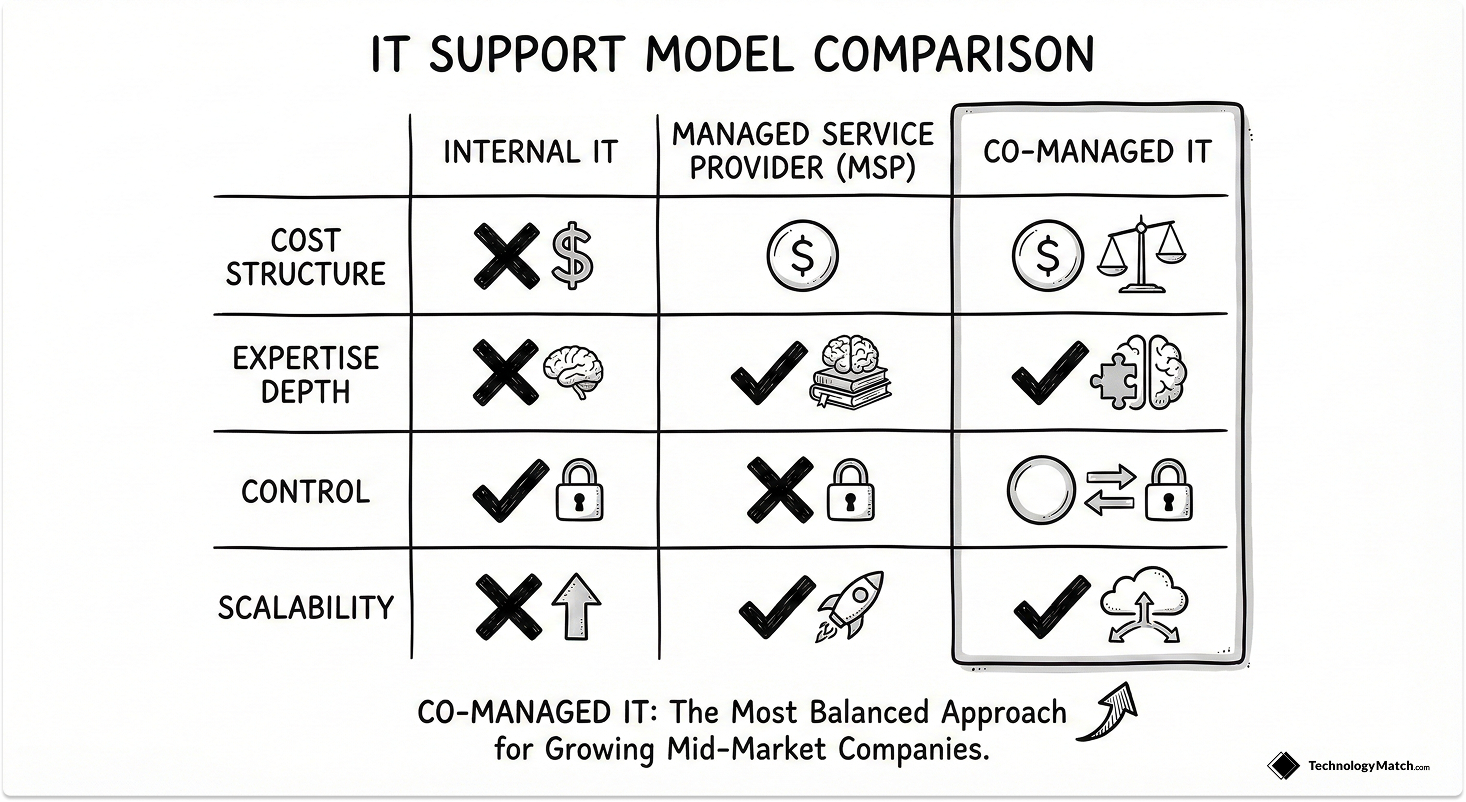
Internal IT vs Managed IT Services
Building an IT department from scratch is expensive. Outsourcing everything carries its own risks. I always tell my team to evaluate the trade-offs before signing a vendor contract.
The Case for Internal IT Teams
Internal employees have a higher dedication to the company. They understand your business deeply and have your best interests at heart. During an emergency, your internal team drops everything to prioritize the problem.
However, internal teams face knowledge gaps. Training staff takes time and resources. If a key staff member leaves, the hiring and onboarding process is painstaking.
The Case for Managed Service Providers
MSPs offer faster time-to-value because you get immediate access to trained skillsets without the hiring delays. They are often more economical than hiring full-time employees. You can hold them accountable to strict SLAs and Key Performance Indicators (KPIs).
On the downside, their attention is divided among all their clients. An MSP will not drop work for other clients to prioritize you in a non-critical emergency. They also bring their own preferred tech stack, which you might have to accept and adapt to.
Comparison of IT Support Models
The Co-Managed IT Model: A Decision-Making Framework
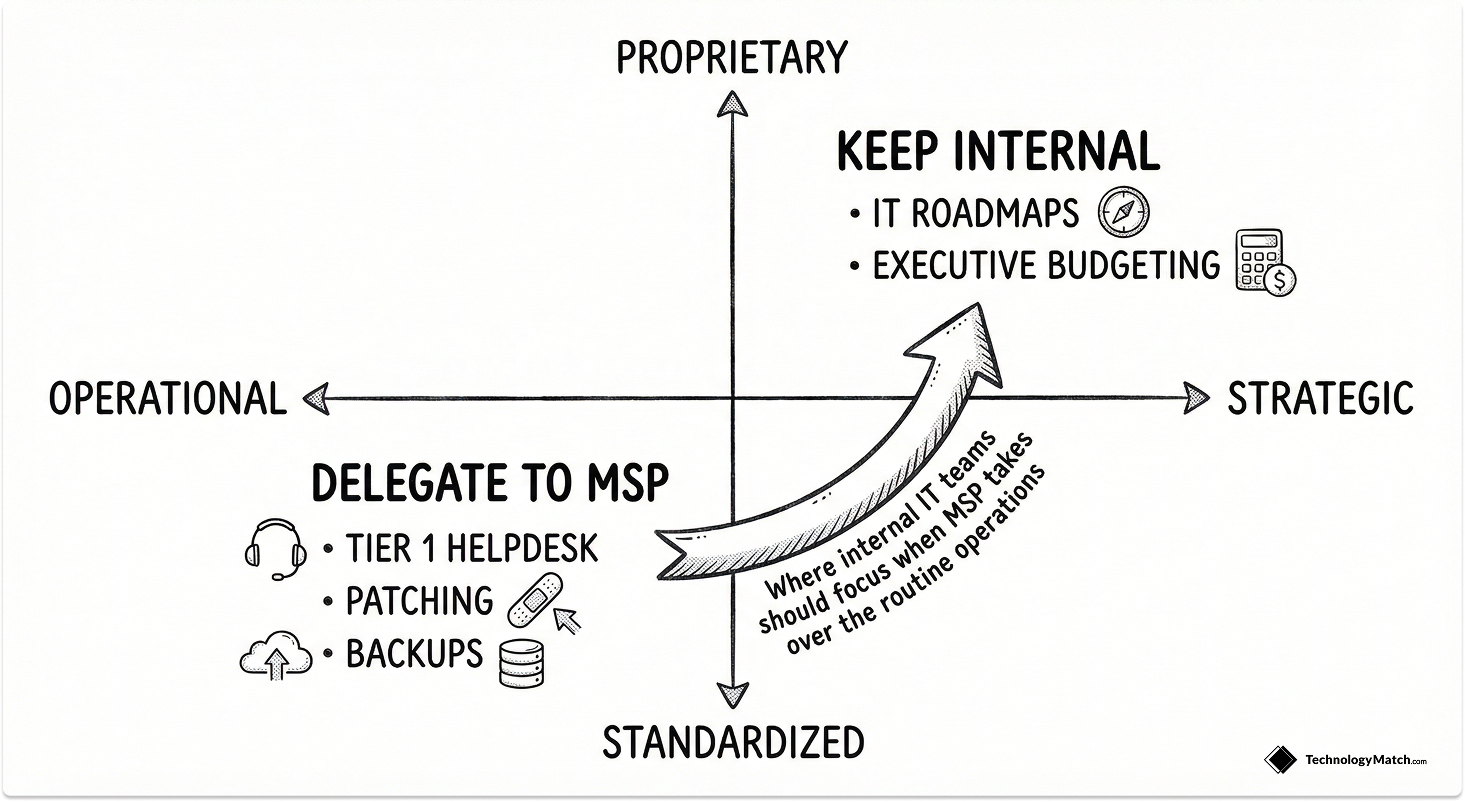
An MSP should never replace your internal team. I use the Workload Delegation Matrix to help IT leaders determine exactly what stays inside the building and what goes to the vendor.
What to Keep Internal
Keep the tasks that require deep business context. No MSP will ever completely understand your business end-to-end.
- Strategic project management and technology roadmaps.
- Proprietary system administration.
- C-suite communication and budget approvals.
- Final security policy decisions.
What to Delegate to an MSP
Delegate the repetitive operational tasks that drain your team's bandwidth.
- Tier 1 helpdesk and basic ticketing.
- Routine workstation patching.
- 24/7 network monitoring.
- Remote location support where you lack dedicated IT staff.
- One-time specializations for security and network installations.
By forcing this separation, you protect your internal team from being burdened with tasks they are not equipped to handle. You maintain control over the strategy while the MSP handles the execution based on their defined SLAs.
Navigating the MSP Tech Stack
Managed service providers deploy their own preferred technology stack. They build their service delivery model around specific tools, and you must adapt to them unless you manage a massive IT department with thousands of employees. I use the Tech Stack Compatibility Framework to evaluate vendor tools before signing an agreement.
Step 1: Audit Internal Tool Overlap
Identify every Remote Monitoring and Management (RMM) and Professional Services Automation (PSA) tool your team currently uses. Compare this list directly against the vendor proposal.
Step 2: Confirm Integration Capabilities
Determine if your internal team can access the vendor monitoring dashboards. If the MSP uses a completely closed ecosystem, your internal staff loses visibility into the network.
Step 3: Establish Data Portability Rules
Define who owns the licenses and the historical ticket data. If you decide to transition away from the provider later, tool lock-in creates severe operational bottlenecks. You must secure data extraction rights in writing.
How to Vet and Choose the Right MSP
You need an IT partner that tailors their solutions to your specific business needs. I rely on the Vendor Discovery Protocol to separate competent providers from aggressive sales organizations. If you want a deeper look into the procurement lifecycle, follow our complete guide on how to switch and select a new IT partner or MSP.

Phase 1: Identify Discovery Red Flags
Start by evaluating their communication style. If the provider only puts sales representatives on your calls, they prioritize revenue over technical alignment. You must demand conversations with technical decision-makers. Reject any vendor that pushes a rigid service package instead of listening to your current challenges.
Phase 2: Assess Operational Maturity
Evaluate their internal processes and operational maturity. Ask them to explain exactly how they handle critical emergency situations like disaster recovery. Provide a real historical incident from your company and ask them to map out their specific response strategy. Compare their proposed solution directly to your actual internal resolution.
Phase 3: Audit Certifications and Compliance
Request documentation for their consultant profiles and industry certifications. Verify they hold relevant standards like SOC 2 or ISO 27001. A provider without verifiable experience solving your specific problem statement introduces unnecessary risk.
Phase 4: Validate Through References
Do not trust marketing materials alone. Reach out directly to their existing clients to get raw feedback. Ask these references how the vendor handles escalations and staff turnover. Present any negative reviews you find online to the vendor and evaluate their response. Transparent partners own their mistakes and explain their corrective actions.
Vendor Management and MSP Accountability
An ongoing relationship with an MSP requires active evaluation. Either side losing accountability leads directly to service failures. I implement the Continuous Accountability Loop to ensure vendors deliver on their promises.
Track Quantitative and Qualitative Metrics
You must take inventory of what the vendor agreed to do versus what they actually delivered. Measure their ticket resolution rate, total ticket volume, and time to resolution. Compare this data directly to the performance metrics you tracked before hiring the MSP.
Do not stop at closed tickets. Vendors sometimes close tickets with generic responses simply to meet their service quotas. Send Net Promoter Score (NPS) surveys to your end-users to determine actual satisfaction with the resolutions. An average or below-average user response requires immediate intervention.
Conduct SLA Reviews
Create a strict habit of reviewing contract agreements and SLAs at frequent intervals. Schedule recurring calls to discuss your observations and hold the vendor accountable for any performance gaps.
Stress-Test Critical Incidents
Your provider proves their actual capabilities during ransomware attacks or hardware failures. Evaluate their response rate to the incident and how swiftly they restored operations. If they refuse to prioritize your business during an emergency, you need a new provider.
Transitioning Away From an MSP
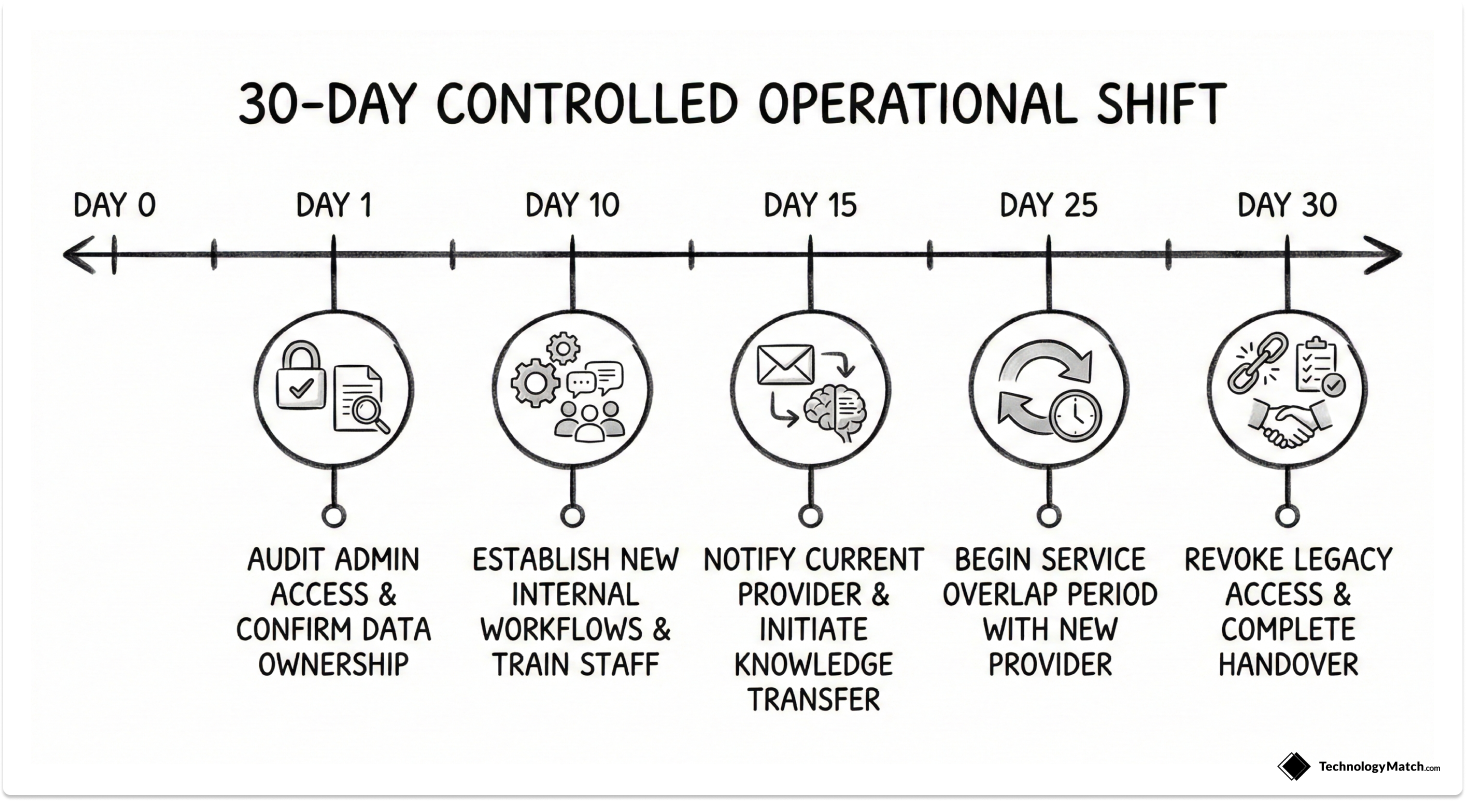
The entire purpose of hiring an MSP is to get the proper assistance you need to meet desired business outcomes. If that assistance fails, you must reconsider your contract. I use the Zero-Downtime Transition Playbook to change providers safely.
Phase 1: Identify the Warning Signs
Document exactly why you are unhappy with their service. Watch for declining technical expertise, frequent failures to meet SLAs, and increasing ticket volumes. A rude, dismissive, or arrogant attitude from your account manager also justifies termination.
Phase 2: Establish the Transition Plan
Do not let go of an MSP without a proper plan. Abrupt decisions cause immediate system chaos. Take the time to establish new internal processes and prepare your staff for the contract termination. Audit all administrative access, confirm data ownership, and establish an overlap period to train the incoming team.
Phase 3: Execute the Handover
Once you finalize agreements with a new provider, notify your current MSP with about 30 days remaining on their contract. Talk to them clearly about why you made the decision to ensure a smooth transition period for your entire infrastructure.
Leveraging Peer Networks
You cannot make critical IT decisions in a vacuum. I source authentic feedback directly from the IT community. Speak to professionals in your own network to get references for vendors they actually trust.
I highly recommend checking communities like the subreddit r/ITmanagers. This forum provides unfiltered reviews and practical advice from actual IT leaders managing similar vendor relationships. Anonymous review platforms and CIO forums also expose hidden service flaws that you will never uncover during a standard sales pitch.
How to Compare MSPs Without Wasting 6 Weeks
Finding the right IT partner often involves months of research and countless aggressive sales calls. If you need to evaluate vendors quickly, read our guide on how and where to find IT vendors and solutions.
You can use our self-serve platform to access a curated marketplace of vetted IT vendors and save weeks of research. You bypass the cold outreach entirely. Your information stays completely anonymous until you actively choose to talk to a provider. You control the evaluation process on your terms using a structured, data-backed matching system.
Read more: Best IT Managed Service Providers to Work With For Mid-Sized Companies in 2026, Ensono vs Kyndryl vs Dataprise vs Expedient: An MSP comparison guide
Looking for IT partners?
Find your next IT partner on a curated marketplace of vetted vendors and save weeks of research. Your info stays anonymous until you choose to talk to them so you can avoid cold outreach. Always free to you.
FAQ
What is the difference between an MSP and an MSSP?
An MSP manages general IT infrastructure, networking, and standard helpdesk support. An MSSP focuses strictly on complex cybersecurity operations, providing advanced threat detection, compliance auditing, and continuous security monitoring for the organization.
How long are MSP contracts?
Standard managed service contracts run between one and three years. Providers prefer multi-year agreements to offset their initial onboarding costs. You should always negotiate a 90-day pilot program or an early termination clause to protect your business.
Can I switch MSPs easily?
Switching vendors is highly disruptive without a strict transition plan. You must document your entire infrastructure, audit administrative credentials, and manage a 30-day overlap period between the old and new providers to prevent system downtime.
What happens if my MSP fails during an incident?
If your vendor fails to meet disaster recovery SLAs during a critical incident, they breach their contract. You must demand an immediate post-mortem report and document the financial impact to justify early termination or seek financial credits.
Do MSPs replace internal IT?
No MSP will completely understand your business end-to-end. They should never serve as a complete replacement for your internal team. Internal teams align with business goals in ways an external vendor cannot replicate.
Are MSPs cheaper than hiring internally?
Hiring an MSP is often much more economical than hiring full-time employees from scratch. An MSP distributes the high costs of specialized engineering talent and advanced security tools across multiple clients.
How do SLAs work?
Service Level Agreements outline the exact performance standards your vendor must achieve. They define guaranteed response times, ticket resolution targets, and network uptime percentages. SLAs provide the metrics you need to hold the vendor accountable.
What industries benefit most from MSPs?
Highly regulated industries like healthcare, finance, and manufacturing benefit the most. These sectors require strict compliance management, complex security monitoring, and reliable remote location support that internal teams often struggle to maintain alone.