IT Vendor Management Lifecycle: 7 Stages Every IT Manager Needs to Run
A stage-by-stage IT vendor management lifecycle guide for IT managers. Control shadow IT, reduce third-party risk, and stop losing budget to auto-renewals.
The average enterprise IT team manages 342 applications. Most of those applications were approved by someone other than IT, renewed automatically without a usage review, and are sitting in your environment right now with active access credentials attached to employees who left the company months ago.
I have seen this pattern across organizations of every size. The problem is never a shortage of tools. It is the absence of a system to govern them. 75% of IT teams have no clear view of what SaaS applications are active in their environment or when those subscriptions renew. That gap costs real money: Zylo's 2024 SaaS Management Index puts the average annual waste from unused licenses at $18 million, up 7% from the prior year.
The IT vendor management lifecycle is the system that closes that gap. It is not a framework for procurement or legal. It is an operating model built specifically for IT managers who need to control what enters their environment, how it runs, and how it exits cleanly.
What Is the IT Vendor Management Lifecycle?
The IT vendor management lifecycle is the end-to-end process that governs how your team finds, contracts, onboards, monitors, renews, and offboards every technology vendor. It covers SaaS applications, cloud infrastructure, managed services, and professional services vendors.
Unlike generic vendor management, the IT lifecycle connects technical due diligence to continuous security monitoring to controlled decommissioning. Every stage produces a documented output that feeds the next one. Nothing falls through the gap between intake and renewal. Nothing exits your environment without a full access teardown.
Why an Unmanaged Vendor List Becomes a Security and Budget Liability
A vendor list tells you what you bought. A vendor management lifecycle tells you what you are getting, what it is costing you, and whether it is safe to keep.
The Direct Cost of Skipping a Lifecycle Process
48% of enterprise applications are now classified as shadow IT, meaning employees deployed them without IT's knowledge or approval. IBM's 2024 Cost of a Data Breach report found that one in three breaches now involves shadow IT, at an average cost of $4.88 million per incident.
License waste runs parallel to that security risk. 53% of SaaS applications go underutilized or completely unused, and the average organization carries 7.6 duplicate subscriptions for the same capability. Business units buy overlapping tools without involving IT. Those tools accumulate data access, API connections, and user permissions that nobody is actively monitoring.
What a Lifecycle Gives Your IT Team
A structured lifecycle gives your team a documented owner for every application, a current record of every security review, and actual usage data at renewal time instead of vendor-provided metrics. You stop negotiating blind. You stop onboarding tools that duplicate what you already pay for. And when an incident happens, you know immediately whether a compromised vendor is active in your environment.
The 7 Stages of the IT Vendor Management Lifecycle
Stage 1: IT Vendor Intake and Qualification
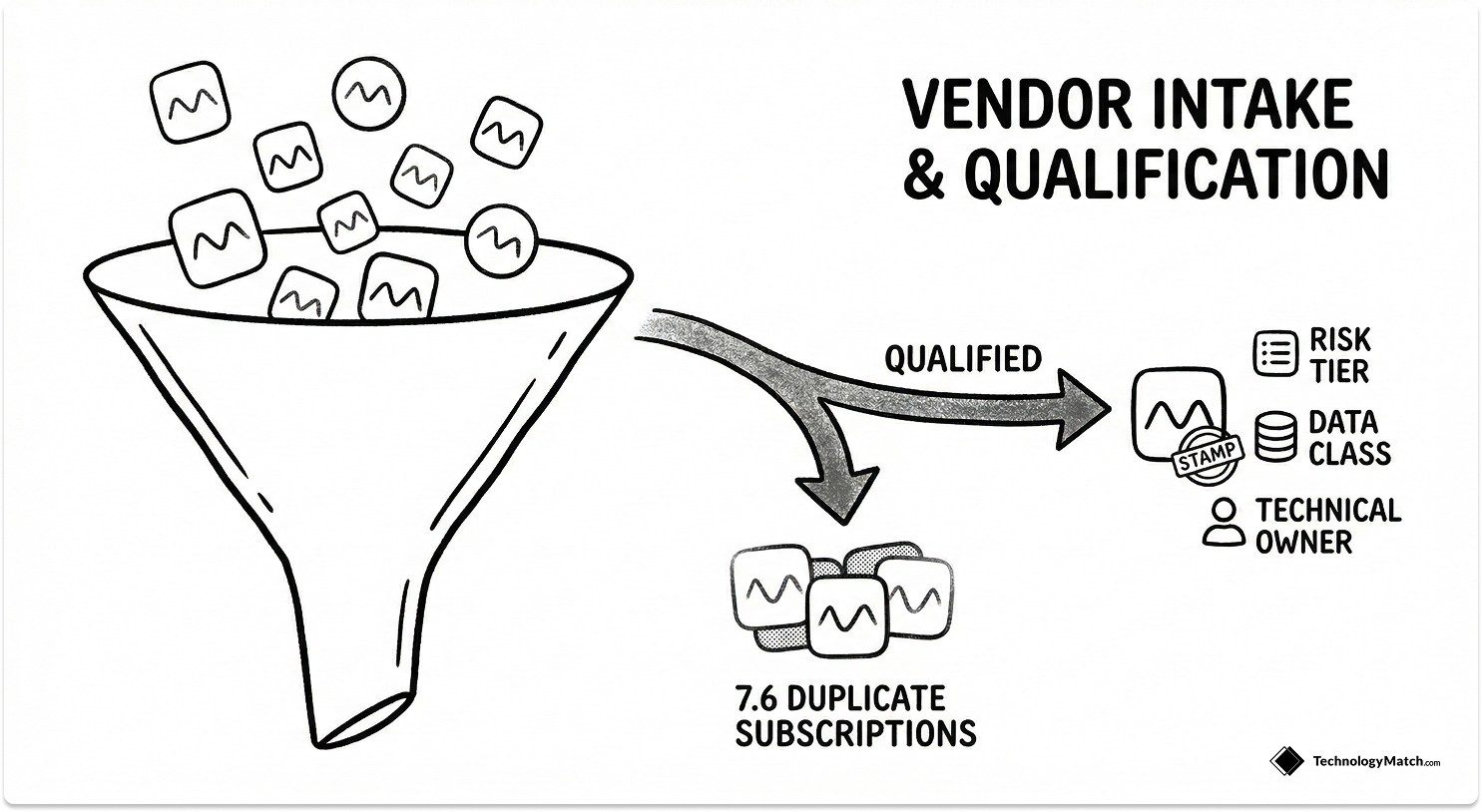
Every vendor relationship starts here. A business unit submits a request, and your team evaluates whether the tool is necessary, whether it already exists in your stack, and what risk it carries before anyone demos anything.
You capture the integration footprint, data classification tier, compliance requirements, and any overlap with existing tools at intake. This is where you stop shadow IT by design rather than by enforcement after the fact. The average organization runs 7.6 duplicate SaaS subscriptions, and almost all of them started with an intake process that skipped the catalog check.
IT-specific callout: Build an auto-check against your approved tool catalog into the intake form. Every incoming request should trigger a lookup before a human reviews it. This one step consistently cuts redundant purchase requests by a significant margin in my experience.
The outputs of Stage 1 are an intake decision with an initial risk tier, a shortlist plan, and clear ownership from both the business and technical side before selection begins.
Stage 2: IT Vendor Selection and Contracting

Stage 2 moves from qualification to commitment. The goal is a defensible vendor selection tied directly to the technical and business requirements captured in Stage 1.
Run scripted demos against your actual workflows, not the vendor's prepared narrative. Use a weighted scorecard so every stakeholder evaluates the same criteria. Treat the security questionnaire as a gate, not a formality. Review API documentation and SSO compatibility before you discuss pricing.
Lock SLAs to metrics your tools can actually measure on day one: uptime logs, incident response timestamps, ticket resolution rates. If you cannot observe it from your existing stack, do not commit to tracking it.
IT-specific callout: Negotiate three clauses that most IT teams skip: data portability rights, explicit exit terms, and mandatory subprocessor disclosure. These cost nothing to include at signature and create enormous leverage later.
Stage 3: IT Vendor Onboarding and Technical Controls Setup
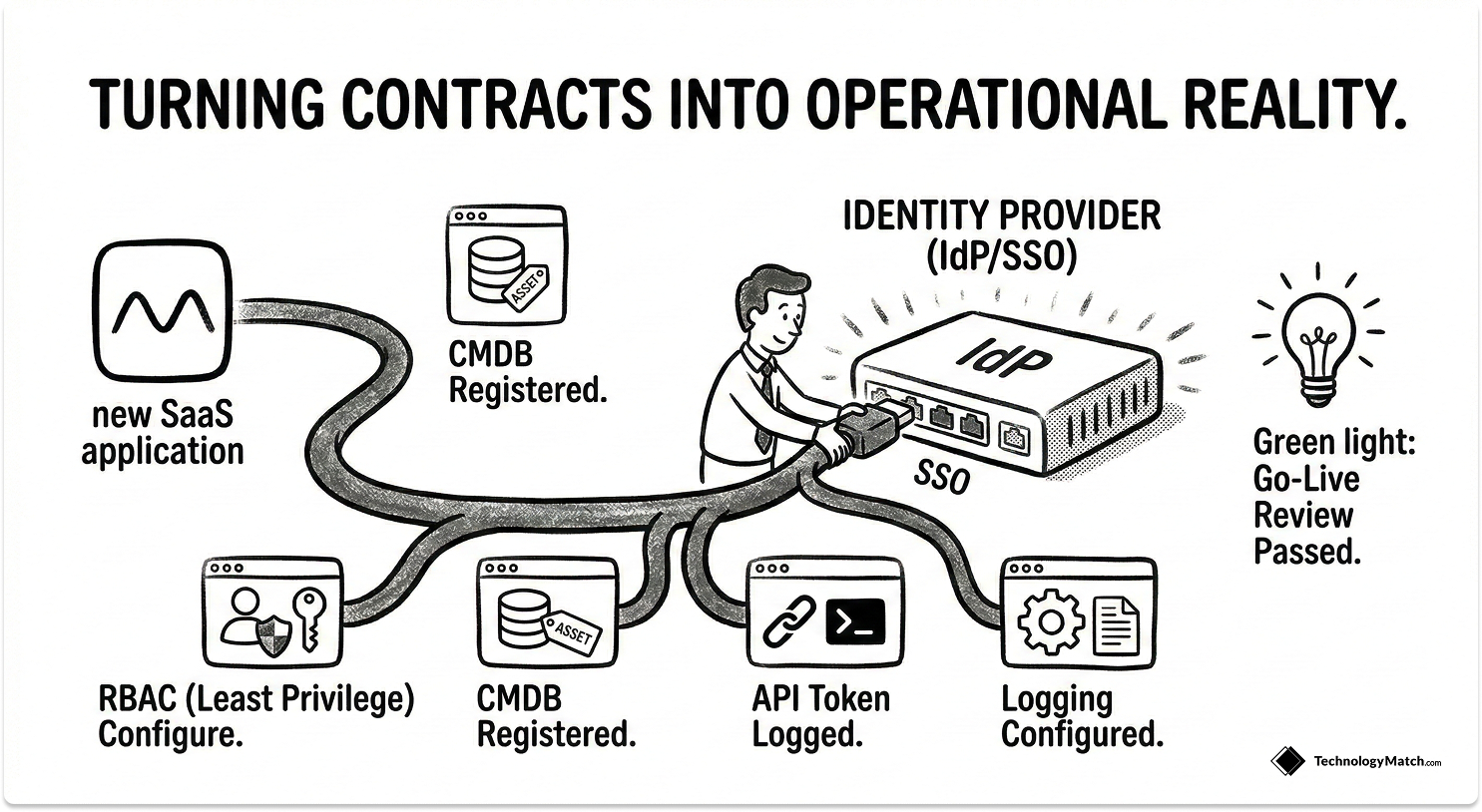
Onboarding is where contracts become operational reality. IT owns this stage entirely.
Set up access through your central Identity Provider or SSO solution. Configure Role-Based Access Control to enforce least privilege from day one. Register the application in your CMDB, map every integration, configure logging, and run a formal go-live review before the tool is handed to users.
Keep onboarding lean and risk-tiered. A low-risk productivity tool does not need the same evidence collection as a vendor processing customer PII. Expand scope only when the risk profile explicitly requires it.
IT-specific callout: Use the downloadable checklist below to standardize your provisioning steps. In my experience, teams that skip a formal onboarding protocol miss CMDB registration and API token logging most often. Those are the two gaps that cause the most pain during incident response.
Stage 4: Continuous IT Vendor Risk and Compliance Monitoring
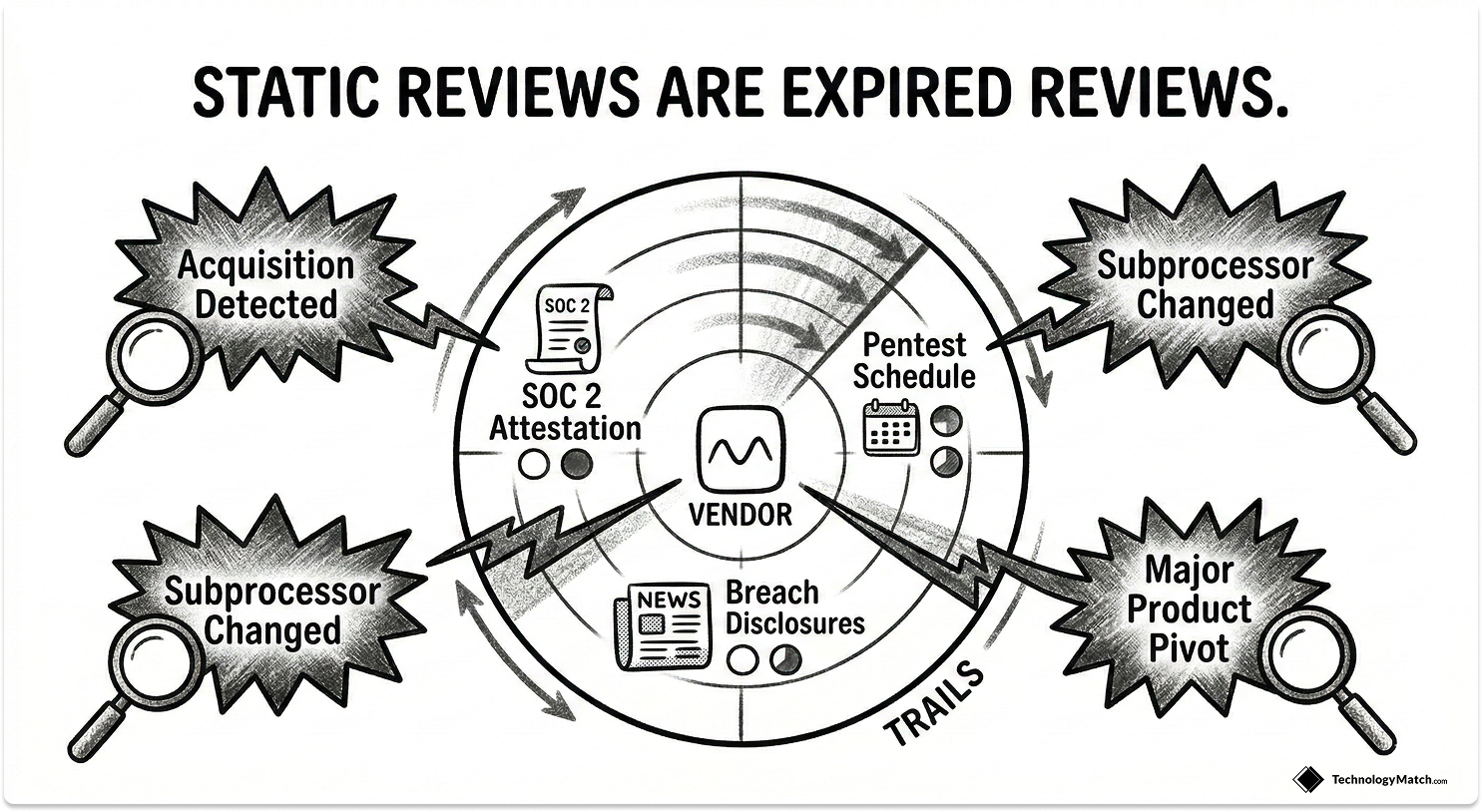
Initial security reviews expire the moment a vendor changes something. Products ship new features. Subprocessors get added. Companies get acquired. Your risk posture from the security questionnaire you ran 18 months ago is not your risk posture today.
Breaches involving a third party jumped to 30% of all incidents, up from roughly 15% the prior year. Another report puts the figure at 35.5%. IBM's 2024 Cost of a Data Breach Report found the average third-party breach costs over $5.08 million, about 40% more than a breach originating inside the organization. A 2024 Third Party Risk Management study found 61% of companies experienced a third-party breach in the past year, a 49% increase from 2023.
The case for continuous monitoring is not theoretical. It is in the incident reports.
Set a tiered review cadence: critical vendors quarterly, everything else semiannually or annually. Monitor SOC 2 attestation currency, penetration test schedules, breach disclosures, and subprocessor changes. Automate alert triggers where possible so your team focuses on judgment calls, not manual lookups.
IT-specific callout: Define unscheduled review triggers explicitly. A subprocessor change, a reported breach, a major product pivot, or a vendor acquisition should automatically open a new risk assessment, regardless of when you last reviewed them.
Stage 5: IT Vendor Performance and Relationship Management

QBRs only work when they are data-first. If your vendor reviews are largely narrative updates from the vendor's account team, you are not managing performance. You are being managed.
Measure what Stage 2 promised: uptime, MTTR, ticket resolution time, feature utilization, active users versus licensed seats. The tools management problem has grown sharply. The average employee now uses 13 SaaS tools to do their job, up 85% from 7 tools in 2022. At that scale, tracking adoption and utilization is not optional. It is the only way to know whether a tool is delivering or accumulating cost for no return.
Use QBR data to identify recurring issues, surface contract underperformance, and generate SLA credit claims before the renewal window opens.
IT-specific callout: Run a 30-minute QBR structure: SLA performance review, open ticket and incident backlog, 90-day decision log. If the meeting ends without documented decisions, it did not happen from a governance standpoint.
Stage 6: IT Vendor Contract Renewal and Negotiation

The 90/60/30-day renewal rhythm exists because leverage disappears fast once a vendor knows you have no active alternative.
At 90 days, validate business outcomes and check consolidation options. At 60 days, pull pricing benchmarks, review usage data from your IdP login logs, and identify every unused license. At 30 days, finalize terms and execute.
The data on what structured renewals return is consistent. Organizations with disciplined renewal processes save 15 to 30% on average through right-sizing, negotiated discounts, and avoided price increases. High-maturity IT organizations managing 100 or more applications report annual savings of $500K to $2M. Vertice data shows the average available discount is 19% off list price, which most teams leave on the table by auto-renewing.
That gap is widening. SaaS price inflation is running at 11.4% annually, nearly five times the standard market inflation rate, while corporate IT budgets grow at 2.8% per year. Every auto-renewal without active negotiation is a budget cut you chose not to fight. 83% of successful renewal negotiations begin at least 120 days before the renewal date, which is why this lifecycle starts the clock at 90 days.
Stage 7: IT Vendor Offboarding and Access Decommissioning

Most IT teams treat offboarding as paperwork. It is not. It is one of the highest-risk events in the entire lifecycle.
40% of departing employees retain access to at least one business application after leaving, with manual processes consistently missing OAuth tokens, shadow apps, and third-party integrations. 44% of organizations have experienced data leakage through former employee accounts. Ponemon Institute research found that 20% of data breaches involve a former employee within six months of departure. Gartner reports that only 44% of companies revoke all access within 24 hours of an employee leaving.
A vendor offboarding follows the same logic as employee offboarding. You remove all IdP groups, revoke API tokens, disable webhooks, clear IP allowlists, and obtain a data deletion certificate from the vendor. You update the CMDB to mark the asset as decommissioned. You run a 30-minute retrospective and feed the findings back into your intake criteria, evaluation scorecard, and onboarding checklist.
IT-specific callout: The offboarding section of the downloadable checklist below covers every decommissioning step. In my experience, the two steps teams skip most often are webhook disablement and OAuth token revocation. Both are invisible in standard access reviews and both have caused real incidents.
How a Single Data Model Connects All 7 Stages
The lifecycle only works at scale when every stage feeds the same data model. Vendor, Engagement, Contract, Risk, KPIs, Assets, and People need to live in one system, not spread across seven spreadsheets owned by seven different stakeholders.
Wire that model to the systems your team already uses: your IdP for access data, your ITSM/CMDB for asset tracking, your ERP for financial records. When intake data flows into selection, selection outputs flow into onboarding controls, and onboarding baselines feed performance reviews, your team stops reconstructing context and starts making decisions.
IT Vendor Management KPIs Worth Tracking
- Intake: Time-to-decision and duplicate request rate. Shows how fast you process requests and how effectively you prevent redundant purchases.
- Onboarding: Time-to-live and controls coverage. Confirms you are deploying tools quickly without cutting security steps.
- Risk: Assessment currency and exception aging. Measures how current your risk picture is and how fast you close compliance gaps.
- Performance: Health score trend and SLA credit rate. Quantifies vendor reliability and confirms you collect financial penalties for outages.
- Renewal: Savings versus benchmark and shelf ware eliminated.
Free IT Vendor Management Lifecycle Checklist
Closing Thoughts
The IT vendor management lifecycle is how you stop managing vendors reactively and start governing your stack as a strategic asset. Each of the seven stages produces decisions and documentation that make the next stage faster and more defensible. Run the intake right, and selection takes half the time. Run the onboarding right, and your risk reviews have a baseline to work from. Run the renewals right, and you walk into every negotiation with facts the vendor cannot dispute.
Looking for IT partners?
Find your next IT partner on a curated marketplace of vetted vendors and save weeks of research. Your info stays anonymous until you choose to talk to them so you can avoid cold outreach. Always free to you.
FAQ
What is the IT vendor management lifecycle?
The IT vendor management lifecycle is a stage-based process that governs how IT teams evaluate, contract, onboard, monitor, renew, and offboard technology vendors. It gives IT managers a repeatable operating model to keep the software stack secure, compliant, and cost-efficient.
How many stages are in the IT vendor management lifecycle?
Seven stages: intake and qualification, selection and contracting, onboarding, continuous risk and compliance monitoring, performance and relationship management, contract and renewal management, and offboarding and transition.
What is the difference between vendor management and vendor lifecycle management?
Vendor management typically covers transactional activities like invoice processing and support escalations. Vendor lifecycle management governs the entire relationship from the initial request through final data deletion, with documented outputs at every stage.
How do IT managers handle vendor risk on an ongoing basis?
By replacing annual point-in-time reviews with tiered continuous monitoring. Critical vendors get quarterly reviews. Lower-risk vendors get semiannual or annual reviews. Specific triggers, like a subprocessor change or breach disclosure, initiate an unscheduled review regardless of cadence.
What tools support IT vendor lifecycle management?
Effective lifecycle management requires a platform that integrates with your IdP for access data, your CMDB for asset tracking, and your ERP for financial records. TechnologyMatch connects all three into a single vendor record.
When should an IT manager offboard a vendor?
When the tool fails to deliver the business value defined at intake, when active usage falls below the threshold that justifies the license cost, or when the vendor fails a security or compliance review during continuous monitoring.